Data Cloud Enablement and Quick Personalization Setup — Guide for Playground Deployment
How to use this chapter: the first part explains the setup model and key concepts. The second part is the implementation walkthrough you can follow step by step.
What this step is about
This chapter assumes the permission setup from Part 1 is already complete. The goal here is narrower and more practical: turn on Data Cloud and run the Salesforce-delivered Personalization setup flow in the target data space.123
This is not yet the chapter for building data graphs, going deep into DMO or DLO design, or configuring personalization points. Those come later. At this stage, the objective is simpler: make the environment ready so the Personalization setup flow can be completed and the playground has the foundational assets required for the next steps.23
For Salesforce Personalization, Data Cloud is not a later enhancement. It is the foundation Personalization uses for data spaces and for the foundational data required to operate. In practice, that means the build cannot move forward until Data Cloud is enabled and a target data space is ready.425 You are not yet designing the final model. You are enabling the base layer and deploying the ready-made Salesforce setup package into the right data space so later configuration work has something to build on.23
How to think about the current setup flow
Approach is simple: use the Personalization setup flow as the main deployment path, and treat it as the step that installs the Salesforce-managed foundation into the selected data space.
What this step actually gives you
Once this step is done, the playground has:
- Data Cloud enabled in the org,
- a known data space selected for Personalization,
- Personalization foundational data deployed to that data space,
- required calculated insights installed and ready to be scheduled,
- an optional path to install the Pipeline Intelligence dashboard,
- an optional path to deploy Attribution Intelligence data.123678
That is enough for the handbook to move on to later configuration chapters.
Implementation Section: the conceptual overview ends here. If you already understand the setup flow and deployment goal, start with the guide below.
Step-by-step guide
Step 1. Confirm the prerequisite from Part 1
Before starting this chapter, confirm that the access setup is already complete:
- the build user is ready,
- the required Personalization permission sets are assigned,
This chapter starts after access is ready.
Step 2. Turn on Data Cloud
Navigate to:
Setup → Data Cloud Setup → Set Up Data Cloud → Get Started1
Salesforce notes that setup can take a few minutes. If Data Cloud Setup does not appear immediately, refresh the page or sign out and back in with the admin user.1
This is the point where the org stops being only “Personalization-capable in theory” and becomes an org where the actual foundation can be deployed.
Step 3. Confirm the target data space
Once Data Cloud is enabled, identify the data space that this playground will use.
Salesforce provides a default data space when Data Cloud is installed, and Personalization can connect to any data space. Salesforce also calls out enhanced data space security as a requirement for Personalization setups.45
At this stage, you do not need a detailed data model yet. You only need to know which data space is the deployment target.
Step 4. Open Personalization Setup
Navigate to:
Setup → Personalization Setup → Setup Home2
In some org experiences, this is surfaced as a quick setup entry point for Personalization. For the purposes of this handbook, this is the place where you start the Salesforce-delivered setup flow for the playground.
Step 5. Start the quick setup flow
Click Start Setup.
For this guide, this is the working start of the “quick setup” phase. The important idea is not the label itself, but what happens next: you select a data space and deploy the foundational setup into it.
Step 6. Deploy to your data space
Select the data space for the playground and click Deploy.3
Salesforce describes this deployment as installing the objects and preconfigured insights required for Salesforce Personalization to function with Data Cloud.3
This is the real milestone of the chapter.
Step 7. Treat foundational deployment as the main outcome
When deployment completes, the org is no longer at the empty-shell stage. The foundational Personalization layer now exists in the target data space.
That is why this chapter matters: it installs the Salesforce-managed baseline that later chapters will build on.
Step 8. Schedule the required calculated insights
Salesforce notes that the foundational deployment installs the required calculated insights, but they must still be manually scheduled. The key required insights are:
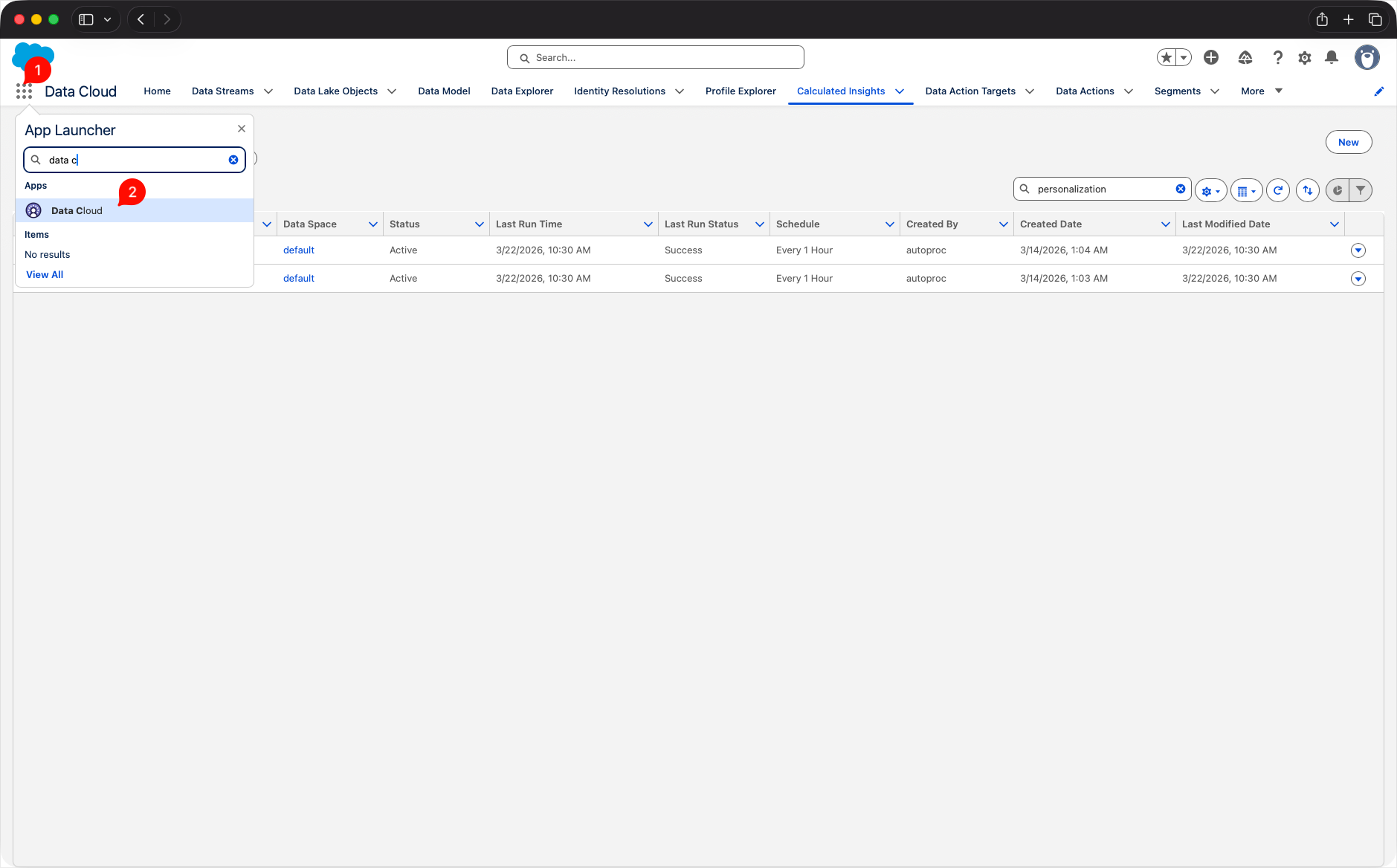
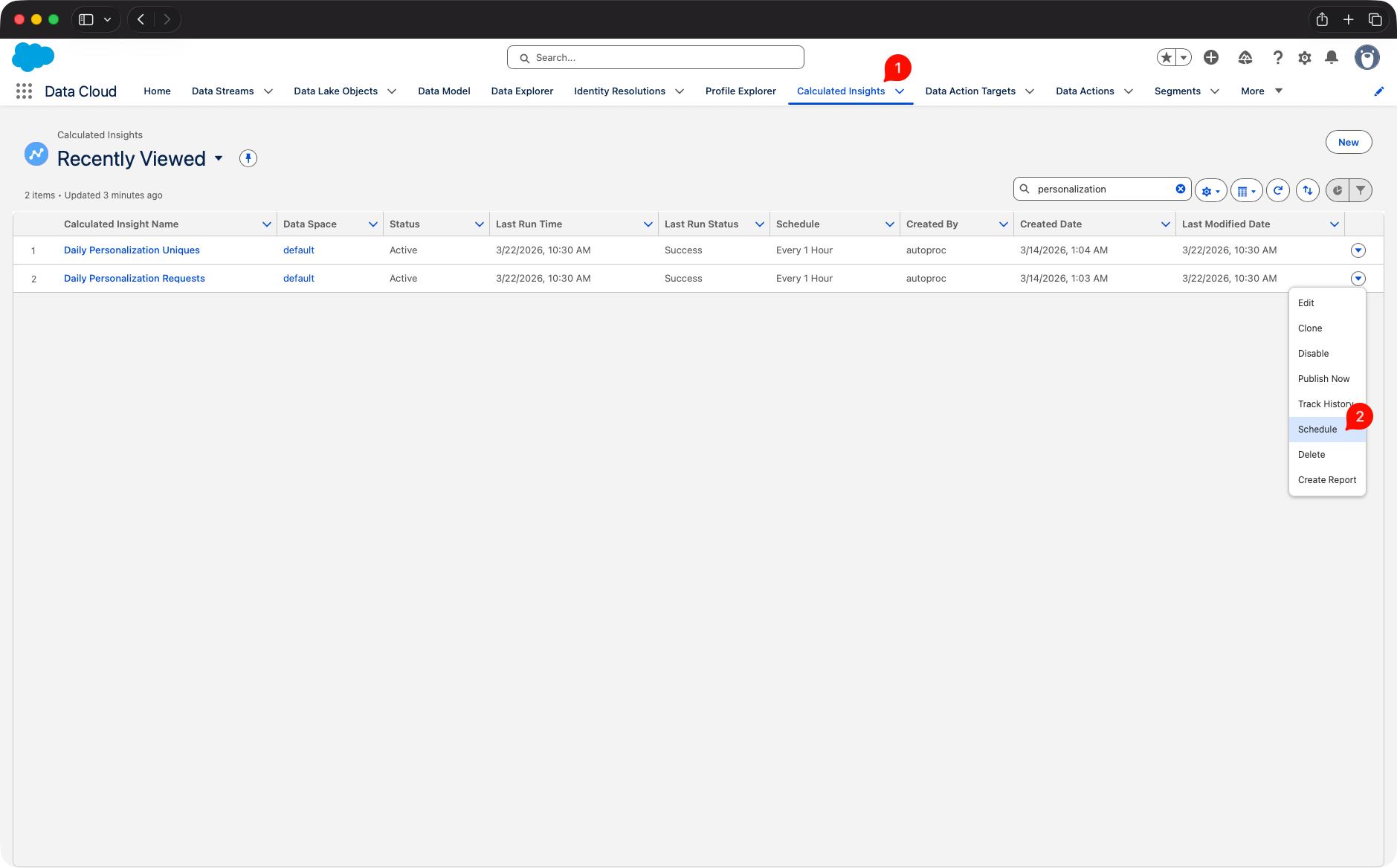
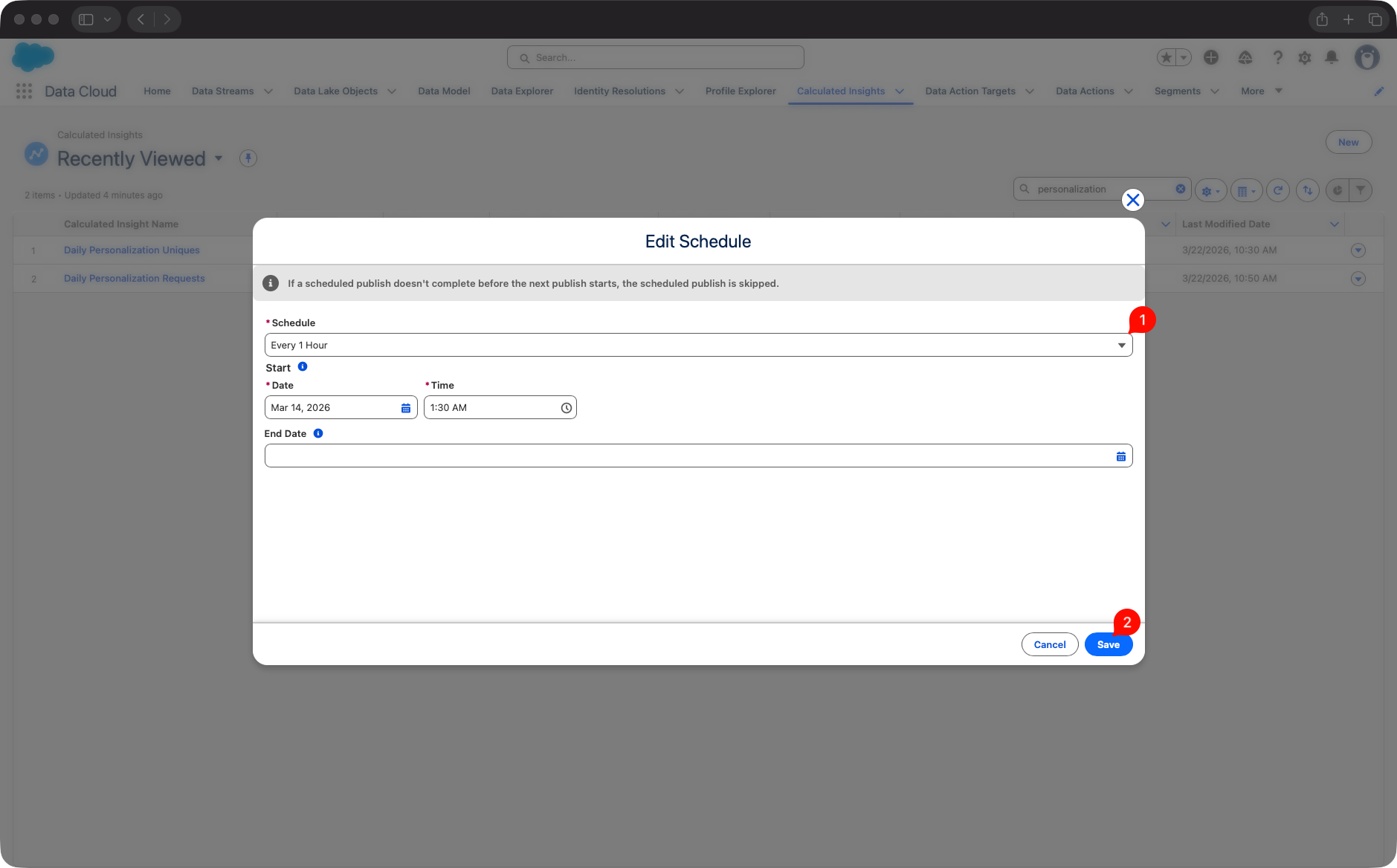
These insights are used to populate the Personalization Pipeline Intelligence metrics, so they should not be left unscheduled.8
Step 10. Verify the result
At the end of this chapter, confirm that:
- Data Cloud is enabled in the org,
- the playground data space is selected,
- Personalization foundational data has been deployed,
- required calculated insights are scheduled,
If all of the above is true, the environment is ready for the later chapters on modeling and configuration.
Shortest version to remember
This chapter is not about designing personalization logic yet.
It is about:
- turning on Data Cloud,
- starting the setup flow,
- deploying foundational data,
- scheduling the required calculated insights,
Sources
Footnotes
-
Salesforce Help, Turn On Data 360 https://help.salesforce.com/s/articleView?id=data.c360_a_setup_provision.htm&language=en_US&type=5 ↩ ↩2 ↩3 ↩4
-
Salesforce Help, Salesforce Personalization and Data 360 Setup https://help.salesforce.com/s/articleView?id=mktg.persnl_setup.htm&language=en_US&type=5 ↩ ↩2 ↩3 ↩4 ↩5 ↩6
-
Salesforce Help, Deploy Personalization Foundational Data https://help.salesforce.com/s/articleView?id=mktg.persnl_setup_deploy_foundational_data.htm&language=en_US&type=5 ↩ ↩2 ↩3 ↩4 ↩5 ↩6 ↩7
-
Salesforce Help, Data 360 Prerequisites https://help.salesforce.com/s/articleView?id=mktg.persnl_setup_data_cloud_prerequisites.htm&language=en_US&type=5 ↩ ↩2
-
Salesforce Help, Data Space Requirements for Personalization https://help.salesforce.com/s/articleView?id=sf.persnl_setup_data_space_requirements.htm&language=en_US&type=5 ↩ ↩2
-
Salesforce Help, Install a Personalization Pipeline Intelligence Dashboard https://help.salesforce.com/s/articleView?id=mktg.persnl_setup_install_pers_pipeline_dashboard.htm&language=en_US&type=5 ↩
-
Salesforce Help, Deploy Preconfigured Personalization Attribution Intelligence Data https://help.salesforce.com/s/articleView?id=mktg.persnl_setup_pers_attribution_intel_data_deploy.htm&language=en_US&type=5 ↩
-
Salesforce Help, Schedule Required Calculated Insights https://help.salesforce.com/s/articleView?id=mktg.persnl_qs_schedule_required_ci.htm&language=en_US&type=5 ↩ ↩2 ↩3